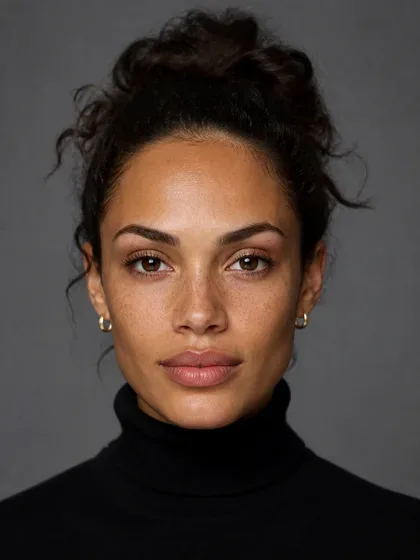
Face Analyzer: How It Works and What Your Results Mean
Learn what a face analyzer can estimate, how to take a suitable photo, and how to interpret shape, symmetry, and proportion results responsibly.
A face analyzer examines a photo to estimate visible facial characteristics, which may include face shape, proportions, and symmetry. Results describe the submitted image, so they can change with camera distance, angle, lighting, expression, and image quality.
The most useful way to read an analysis is as a guide to visible patterns, not a verdict on your appearance. It can help you compare styling or photography choices, provided you separate what the image shows from how the tool interprets it.
What a face analyzer can tell you

Photo-based face analysis compares the outlines, positions, and relationships of facial features. Some systems use facial landmarks, meaning reference points such as the eye corners, nose tip, or chin, to organize those comparisons.
For example, an analyzer might compare the apparent width of the cheekbones with the width of the jaw. That relationship can contribute to a face-shape classification, but it cannot describe the full three-dimensional structure of your face.
Different analyzers provide different outputs. Facefy’s AI Face Report provides a broader overview of visible facial characteristics through photo-based analysis. Read each label according to its description in the report rather than assuming every service measures the same features or uses the same scale. A shape category, a width ratio, and an appearance score answer different questions.
Analysis is most useful when you have a practical goal, such as understanding your outline before comparing haircuts, exploring frame shapes, or identifying why one portrait looks different from another.
Three types of face analyzer results
Sort each reported item into one of these three categories. The examples below illustrate how to interpret an output if it appears in your report. They are not a list of features every analyzer provides.
| Result type | Concrete example | Main limitation |
|---|---|---|
| Observable feature (measured relationship) | Facefy Facial Ratios: estimated face length-to-width ratio | Depends on visible boundaries and selected measurement points |
| Derived classification | Estimated oval face shape | Categories overlap |
| Subjective estimate | AI-generated appearance score | Reflects model-specific judgments |
Observable features and measured relationships describe what is visible in the image. A tapered jaw contour, relatively broad forehead, or estimated length-to-width ratio is based on detectable boundaries or landmarks. Hair, shadows, crop, and head rotation can affect those observations.
Derived classifications combine observations into a label. An estimated oval shape might reflect greater face length than width, a gently curved jaw, and a narrower chin. No single measurement establishes the category.
Subjective estimates add an evaluative interpretation. If an analyzer provides an attractiveness score, that number reflects its scoring approach, not an objective measure of beauty. Different models may reflect different preferences and demographic representation in their training data.
Symmetry and proportion measurements are not automatically subjective ratings. They can describe geometric relationships in a photograph. The subjective step occurs when those relationships are converted into claims about attractiveness or an “ideal” face.
How to take a suitable face analysis photo
Use this six-point self-check before choosing an image:
- Face forward. Keep your head upright and look toward the camera. Avoid turning one cheek toward the lens or tilting your head sideways.
- Place the camera near eye level. Support the phone if needed so you can look straight ahead without raising or lowering your chin.
- Use a neutral expression. Relax your eyebrows, cheeks, and mouth. Do not deliberately tighten your jaw or stretch your lips.
- Choose even front lighting. Face a window with soft daylight or another diffuse light source. Avoid strong side shadows and bright areas that lose detail.
- Keep the full facial outline visible. Include the forehead, cheeks, jaw, and chin. Move hair away from the boundaries where practical. Remove or adjust glasses if they obscure the eyes or cast strong shadows.
- Turn off beauty filters and portrait effects. Use a clear, focused image without face reshaping, skin smoothing, or effects that alter the outline.
Facial hair can conceal the jaw, and a less visible hairline can make face-length estimates uncertain. Treat those areas accordingly rather than trying to force a precise result. The goal is a representative photo, not a perfected one.
Why a close selfie can change facial proportions
In a close selfie, the nose is proportionally much nearer to the camera than the ears or sides of the face. This can make central features appear more prominent relative to the outer face.
Camera distance drives perspective. Focal length affects how much of the scene fits into the image, while cropping changes the framing. Cropping a close selfie does not undo the perspective already captured.
Compare these two setups:
- Close handheld selfie: The phone is close to your face, often slightly above or below eye level. Nearby features can look more prominent, and the apparent jaw width or facial spacing may differ.
- More distant eye-level portrait: The camera is farther away, so the relative distance differences between facial features are smaller. The resulting proportions may look less exaggerated.
If proportions look unexpected, place the camera roughly 1 to 2 metres away, where practical, and use a timer. Keep it near eye level, then crop the finished image while retaining the full facial outline and enough detail. Facefy’s Facial Ratios tool can help you explore the relationships between visible facial measurements using a suitably prepared photograph.
Distance, combined with camera height and head position, can change apparent nose prominence, face length, jaw width, and feature spacing. Neither setup perfectly reproduces how a moving, three-dimensional face appears in person.
What can make face analyzer results change
Your facial structure does not need to change for a photo-based estimate to change. The analyzer receives a different arrangement of pixels each time.
| Input variable | Possible image effect | Practical adjustment |
|---|---|---|
| Head rotation | One side appears narrower | Face the lens directly |
| Camera height | Vertical relationships appear different | Keep the camera near eye level |
| Camera distance | Nearby features appear more prominent | Step back, then crop |
| Facial expression | Cheek and jaw contours shift | Relax your face |
| Directional lighting | One side looks more defined | Use soft front lighting |
| Bangs or glasses | Boundaries or landmarks become obscured | Clear relevant areas |
| Makeup | Contours and contrast appear different | Keep presentation consistent |
| Tight crop | Forehead or chin gets excluded | Include the whole outline |
| Blur or compression | Feature edges lose definition | Use a clear original image |
A smile raises the cheeks and changes the mouth and lower-face outline. Strong side lighting can make one jaw edge look sharper while obscuring the other. Neither necessarily indicates a structural difference.
Lens distortion can also affect geometry, particularly near the edges of some wide-angle images. Keep your face near the centre of the frame. Switching lenses without changing distance may change framing or optical distortion, but it does not remove the perspective caused by standing too close.
It helps to separate three influences:
- Relatively stable characteristics: facial structure and broad feature relationships.
- Changeable presentation: hairstyle, makeup, glasses, facial hair, and expression.
- Photo conditions: camera position, lighting, crop, focus, and compression.
Use two photos to check consistency
Two suitable photos can help you understand whether a broad result is consistent without turning the exercise into repeated score checking.
- Take two separate portraits at approximately the same distance, with an eye-level camera, neutral expression, and even front lighting.
- Compare broad patterns, such as a tapered jaw or greater face length than width. Do not expect every value to match exactly.
- If the labels differ, compare the photos first. Look for head rotation, distance changes, expression, hair placement, glasses, or shadows.
- Allow for overlapping categories. If both photos are suitable, a round result in one and an oval result in the other may reflect a face near the boundary between those descriptions.
Blended characteristics are normal. A face can have the curved jaw associated with a round category and the greater length associated with an oval category.
Decision rule: If the underlying observations remain similar but the label changes, use the shared observations. If the photos differ visibly, treat the changed result cautiously. If results remain inconsistent, avoid basing a decision on that label.
There is no universal accuracy percentage for online face analyzers. Reliability depends on the tool, the specific output, and the quality of the submitted photo. Locating a visible landmark is a different task from assigning a face-shape category, and neither makes an appearance rating objective.
A tool can also make errors. Two photos cannot establish accuracy, but they can reveal how sensitive a result is to the input. Stop after this limited comparison rather than cycling through images to obtain a preferred score.
How to interpret face shape, symmetry, and proportions
Face shape: combine several cues
Consider face length, forehead width, cheekbone width, jaw contour, and chin shape together. Facefy’s Face Shape Detector can help you explore these visible characteristics and obtain an estimated face-shape classification from a photograph.
A broad forehead alone does not establish a heart-shaped face. A more useful description might be “broad upper face with a gradually narrowing jaw.” That description remains useful even if the category changes between photos.
Symmetry: distinguish anatomy from pose
Symmetry describes left-to-right correspondence. Ordinary differences between the two sides of a face are common.
A photograph can exaggerate those differences through head rotation, an uneven expression, or directional lighting. One eye appearing higher in an image does not, by itself, establish the same difference in an upright, evenly photographed face.
A symmetry result is not a complete attractiveness assessment, and a numerical score may be specific to the service that produced it.
Proportions: read relationships, not targets
Proportions compare dimensions. One illustrative calculation is:
Face length-to-width ratio = visible face length ÷ visible face width
For example, an illustrative measurement of 180 pixels divided by 130 pixels produces a ratio of approximately 1.38. This example demonstrates how a ratio works. It does not reproduce a particular tool’s measurement points or calculation method.
Other proportion frameworks include:
- Facial thirds: approximate vertical sections from hairline to brow, brow to nose base, and nose base to chin.
- Facial fifths: horizontal comparisons using roughly eye-width sections.
- Golden-ratio comparisons: comparisons with a mathematical ratio of approximately 1.618.
These frameworks do not establish universal beauty standards. Hairline visibility, landmark choices, pose, and measurement methods all affect the result. No face-shape category, symmetry level, or proportion is inherently better than another.
Turn the result into practical styling ideas
Suppose two suitable photos suggest an oval-round blend. Instead of deciding which label is “correct,” compare options that suit the shared characteristics.
For hair, you could compare a style with more height at the crown against one with more fullness at the sides. The first may emphasize vertical length; the second may emphasize width or softness. Neither is a correction.
For glasses, compare a gently angular frame with a rounded frame:
- Angular edges can introduce contrast against curved facial contours.
- Rounded edges can echo those contours.
- Bridge fit, frame width, pupil positioning, and comfort remain more important than a shape label.
Use a simple decision sequence:
- Choose the effect you want: emphasize length, add visual width, highlight the eyes, or echo existing contours.
- Compare two realistic options: avoid working through an entire catalogue of supposedly suitable styles.
- Check practical fit: consider hair texture, density, styling time, prescription needs, and comfort.
- Choose by preference: keep the option you enjoy, even if it falls outside conventional shape advice.
A face-shape estimate narrows possibilities. It should not dictate them.
What a face analyzer cannot determine
The appearance analysis discussed here:
- Does not identify health conditions.
- Does not establish someone’s identity or replace biometric identification.
- Does not establish an objective standard of beauty.
- Does not determine personal worth.
It also cannot reliably establish personality, intelligence, mental health, genetic background, or other hidden characteristics from appearance.
Medical or functional concerns, such as pain, changes in vision, or difficulty chewing, belong with an appropriately qualified professional rather than an appearance-analysis tool.
Check photo privacy before uploading
A face photo is personal information. Review the service’s privacy information to understand how images are processed, retained, shared, and deleted.
Look for answers to these questions:
- Is the image stored, and for how long?
- Is it used for purposes beyond generating your result?
- Can you delete the uploaded image or associated account data?
- Are any third parties involved in handling it?
Do not assume automatic deletion, a particular storage location, encryption, or restrictions on sharing unless the service states them. Upload another person’s photo only with their knowledge and permission.
Choose an image without unnecessary background details or other people. If the available privacy information does not meet your preferences, do not upload.
Face analyzer questions
Can a face analyzer determine face shape?
It can estimate a category from visible cues such as face length, relative widths, and jaw contour. The categories overlap, so a blended description may be more useful than a single label.
Can a face analyzer identify health conditions?
No. A photo-based appearance analyzer is not a medical assessment. Take health concerns to an appropriately qualified professional.
What photo should I use?
Choose a clear, front-facing photo with the camera near eye level, a neutral expression, even front lighting, the full facial outline visible, and no beauty filters or portrait effects. A straightforward portrait provides a better basis for interpretation than a heavily styled or unusually angled image.
Get a broader appearance overview
If your goal is to organize visible facial characteristics into a broader overview, Facefy’s AI Face Report provides photo-based face analysis and a report of visible appearance characteristics. Read the outputs actually shown, apply the distinctions above, and use the result to support a specific styling or photography decision.